Getting Maximo Data into watsonx.data: MIF, Kafka, and Bulk Export
🎯 Who this is for: Integration developers scoping the actual extraction pipeline, data engineers deciding which Maximo objects need which cadence, architects sizing Cloud Pak for Data against a standalone Db2 Warehouse footprint, and anyone who read Part 1's case for watsonx.data and immediately asked "okay, but how does the data actually get there."
Series: Part 2 of 6 — MAS 9 + IBM watsonx.data: Building the Maximo Open Lakehouse | Read time: 17 minutes
📖 The Question This Post Actually Answers
Part 1 made the honest case for watsonx.data past the MAS 9 native-analytics ceiling — Cognos's three authoring seats, Health's inability to ingest weather data, Predict's fixed model catalog. If you're reading Part 2, you've accepted that argument, or at least you're taking it seriously enough to ask the next question, which is far less abstract: how does Maximo data physically get from `WORKORDER` and `ASSET` into an Iceberg bronze table, and which of the available methods should carry which table?
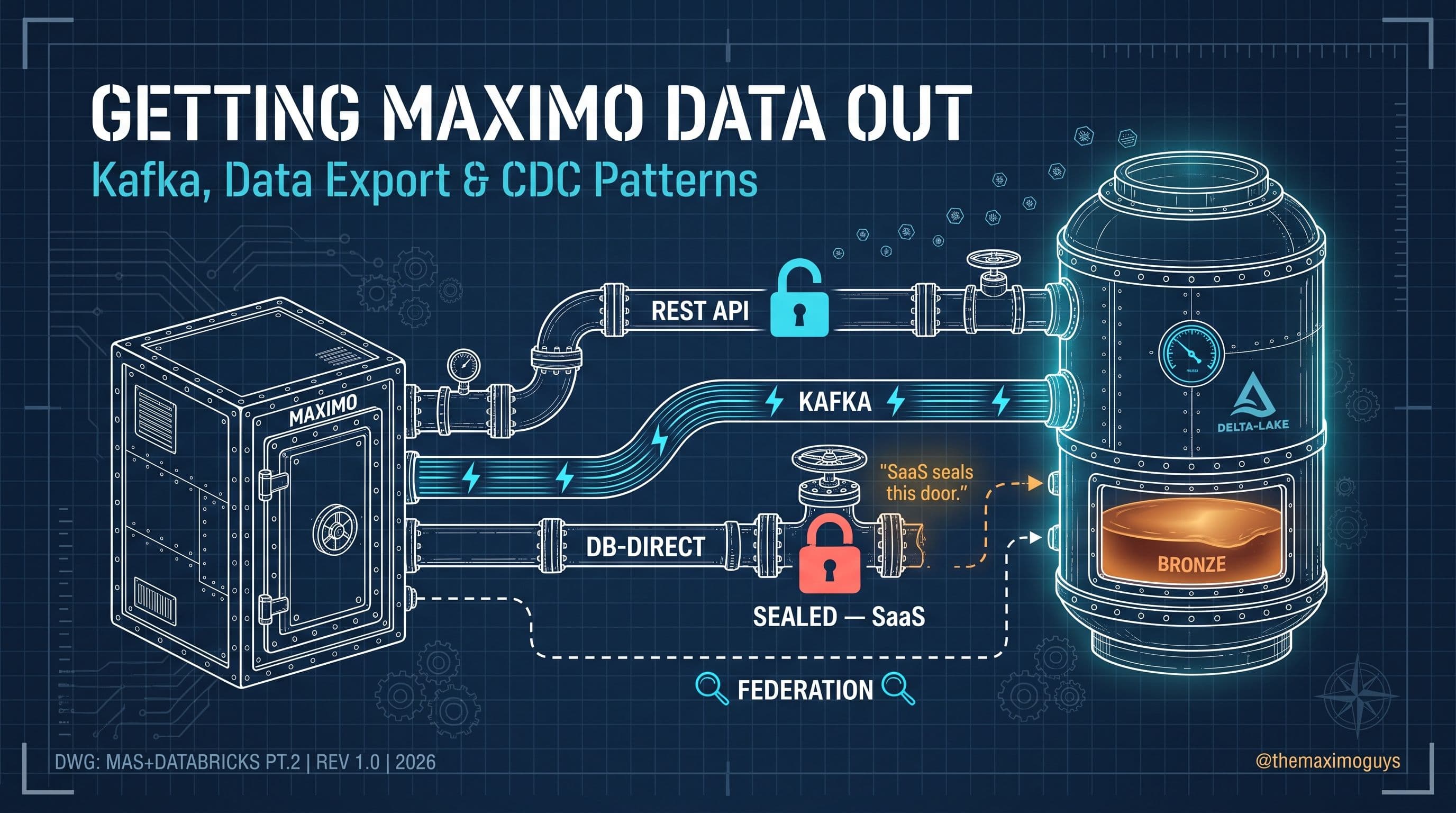
This is the question a lot of watsonx.data pilots get wrong in the first month, not because the mechanics are exotic, but because there are three legitimate answers and most teams pick one before understanding what the other two are for. IBM documents exactly three sanctioned extraction patterns for Maximo data — MIF REST/JSON, the Kafka source connector, and MAS 9.1's asynchronous bulk export — and each one exists because the other two are wrong for a specific class of table. Getting this decision right per-table, rather than forcing every object through a single pattern, is most of what separates a watsonx.data pipeline that stays healthy at scale from one that turns into a maintenance burden by month six.
💡 Key insight: There is no single "correct" extraction method for Maximo data — there's a correct method per table, per latency requirement. A shop that tries to runMEASUREMENTreadings through the same nightly bulk-export job asCLASSSTRUCTUREreference data is solving two very different problems with one tool, and it shows up first as staleness, then as a scramble to bolt Kafka on after the fact.
📊 Three Sanctioned Patterns at a Glance
Before the mechanics of each, here's the load-bearing comparison this entire post builds from — what each pattern actually does well, and where it doesn't apply.
| Pattern | Best For | Latency | Requires |
|---|---|---|---|
| MIF REST/JSON (OSLC) | Scheduled, filterable, relationship-following pulls; anything feeding an ML feature set | Minutes to hours (poll-driven) | API key or basic auth, no additional infrastructure |
| Kafka source connector | Event-driven, near-real-time streams — status changes, meter readings | Seconds to low minutes | Maximo Manage configured for Event Streams; watsonx.data's Kafka connection asset |
| Asynchronous bulk export | Large periodic extracts — historical backfills, multi-year training sets | Hours (batch, page-by-page) | S3 bucket or MIF global directory target; MAS 9.1+ |
Every extraction decision in this post reduces to matching a row in this table to a Maximo table's actual access pattern. WORKORDER status updates that feed a live dashboard belong in the Kafka row. A five-year FAILUREREPORT backfill for model training belongs in the bulk-export row. Everything in between — which, in practice, is most of a first watsonx.data build — belongs in the MIF row.
🔌 Method 1 — MIF REST/JSON: OSLC, Synonym-Domain Values, and API Keys
The Maximo Integration Framework's REST/JSON layer, built on OSLC (Open Services for Lifecycle Collaboration), is IBM's preferred pattern for the reason Part 1 already implied: it's the most complete, most flexible, and least infrastructure-heavy of the three. OSLC exposes a query language that maps directly to native SQL concepts — select specific attributes, follow relationships across object structures, filter with oslc.where, and page results — without requiring you to write or maintain SQL against a database you likely can't reach directly anyway (more on that constraint below).
Here's a representative MIF REST/JSON call pulling a filtered, paged slice of WORKORDER data — the same shape of request a watsonx.data ingestion job would run on a schedule against the bronze layer:
GET https://{your-mas-instance}/maximo/oslc/os/mxapiwo
    ?oslc.select=wonum,siteid,orgid,assetnum,location,status,statusdate,
                 failurecode,problemcode,reportdate,
                 actlabcost,actmatcost,actservcost
    &oslc.where=status="COMP" and reportdate>="2026-07-01"
    &oslc.pageSize=500

Headers:
  apikey: {YOUR_API_KEY}
  Accept: application/json
Two details in that request matter more than they look. First, oslc.select and oslc.where are doing real filtering and column-pruning server-side — you're not pulling every WORKORDER column and discarding most of it downstream, which matters once you're running this against millions of rows on a schedule. Second, oslc.pageSize is your throughput lever: MIF pages results rather than streaming them, so a bronze-layer ingestion job needs to loop through pages until it receives an empty result set, not assume a single call returns everything.
The synonym-domain detail that actually matters for ML. Maximo's synonym domains let a single internal value display differently depending on site, organization, or language — a STATUS of COMP might render as "Complete," "Completado," or a custom label depending on who's looking at it. MIF's REST/JSON layer can be configured to return the internal value rather than the localized display string, and for a watsonx.data pipeline feeding Spark feature engineering or a watsonx.ai model, this is not a cosmetic detail — it's the difference between a stable, groupable feature code and a silently fragmented one. If your bronze extraction pulls display values instead of internal ones, the same failure mode can show up as three or four different strings across sites, and every downstream aggregate — MTBF by failure code, cost-per-failure-type — quietly under-counts because the group-by never sees them as the same value.
Authentication note: IBM's own documentation flags that SOAP/REST integrations may require moving from basic authentication to API keys, particularly as Maximo Application Suite tightens default security posture across releases. Build your extraction jobs against API-key auth from the start rather than basic auth you'll need to migrate later — it's a one-line header change now versus a credential-rotation project in production.
💡 Key insight: MIF's OSLC layer isn't a lightweight REST wrapper bolted onto Maximo — it's a first-class query language with select, filter, relationship-following, and paging, built specifically so integration developers don't need database access to get a well-shaped extract. That completeness is exactly why IBM calls it the preferred pattern.
📡 Method 2 — Kafka: Near-Real-Time Streaming from Manage to Bronze
MIF handles scheduled pulls well, but some Maximo data genuinely needs to move faster than any poll interval can justify — a work-order status flip from WAPPR to INPRG feeding a live operations dashboard, or a meter reading arriving on a two-minute cadence that a predictive model needs to see within seconds, not the next MIF poll window. This is what the Kafka path is for, and it runs through infrastructure Maximo Application Suite already exposes natively, not a bolt-on integration.
Configuring Maximo's side. MAS's own Suite Administration dashboard has a dedicated Apache Kafka configuration path — Other configurations → Configurations → Apache Kafka — built specifically to connect Manage to an Event Streams service. The configuration IBM documents is concrete, not abstract:
| Setting | What You Provide |
|---|---|
| Hosts/Hostnames | One row per Kafka broker — IBM's own example configuration lists six broker hostnames from the Event Streams service credential |
| Port | The broker port from the Event Streams credential (IBM's documented example uses 9093) |
| SASL Mechanism | Plain — the default authentication mechanism for Event Streams |
| Username / Password | From the Event Streams service credential |
| Certificates | A full SSL chain: an intermediate certificate (IBM's example uses a Let's Encrypt R3 intermediate) plus a root certificate (ISRG Root X1 in IBM's documented example) |
Once saved, the configuration reconciles in the background — IBM's documentation notes this can take up to ten minutes — and the connection is confirmed live only when its status reads Configuration Ready. That reconciliation delay is worth planning around: a Kafka configuration change is not instantaneous the way a REST API-key rotation is, and a pipeline that assumes it can flip Kafka settings and immediately resume streaming will see a gap.
Landing the stream in watsonx.data. On the receiving side, watsonx.data has a native Apache Kafka source connection asset — built to connect to a real-time Kafka processing server and read event streams directly into bronze Iceberg tables, with documented support for current Kafka protocol versions. The practical pipeline shape looks like this:
Maximo Manage (status changes, meter events)
    → Event Streams (Apache Kafka, SASL plain, TLS)
        → watsonx.data Kafka source connection
            → Bronze Iceberg table (append-only, event-time partitioned)
This is genuinely the right pattern for WORKORDER status-change events and MEASUREMENT readings — the two Maximo data types where a several-minute MIF poll interval is measurably worse than an event arriving as it happens. It is very much the wrong pattern for slowly changing reference data like CLASSSTRUCTURE or LOCATIONS — standing up and maintaining a Kafka stream for data that changes weekly is real operational overhead bought for latency nobody needs.
💡 Key insight: IBM's 2026 acquisition of Confluent — the company behind enterprise Kafka and Flink — signals where watsonx.data's real-time story is heading, with deeper Kafka/Flink integration ("Context in watsonx.data") in private preview as of mid-2026. Treat that as direction, not a shipped capability to build a Maximo pipeline around today; the Event Streams connector described above is what's actually available now.
📦 Method 3 — MAS 9.1 Bulk Export: UI Download vs. Asynchronous Pipeline Export
This is the method most likely to get conflated with itself, because MAS 9.1 actually shipped two distinct export mechanisms that share a name in casual conversation but behave completely differently.
The UI-triggered export is what an end user reaches by clicking Export on a Maximo list view — a genuinely useful feature for backing up a filtered view or moving a dataset to another MAS instance, but capped at 60,000 rows per download. Filters are your only lever to stay under that ceiling; there's no pagination option in the UI path. If your extract exceeds 60K rows, IBM's own documentation is explicit that you need the Maximo Integration Framework instead — which is exactly the segue into the second mechanism.
The asynchronous bulk export pipeline is the one that actually matters for a watsonx.data ingestion architecture. MAS 9.1 exports table data asynchronously, page-by-page, in the background, then combines those pages into a single downloadable file written to an S3 bucket or the MIF global directory — the same global directory concept governed by the mxe.int.globaldir system property that MIF's flat-file export/import has used for years, now extended to this paginated pattern. Azure Blob storage is separately supported specifically for attachments. This is the pattern to reach for when you need a large, periodic extract — a multi-year FAILUREREPORT history to seed model training, for instance — where looping MIF REST calls through enough pages to cover the same volume would be a meaningfully slower and more fragile way to move the same data.
MAS 9.1 asynchronous export job
    → paginated table read (background)
        → combined file written to:
              S3 bucket, OR
              MIF global directory (mxe.int.globaldir)
                → watsonx.data batch ingestion → Bronze (Iceberg)
Keep these two mechanisms mentally separate: the UI export is a manual, human-triggered convenience feature you'd never script into a nightly pipeline; the asynchronous export is the pipeline-oriented mechanism actually built for the extraction volumes a lakehouse project generates. Conflating them in an architecture document is a fast way to have someone budget for "the 60K export" when the real requirement is millions of historical rows.
💡 Key insight: "Bulk export" in MAS 9.1 isn't one feature — it's two, aimed at two different users. Knowing which one your architecture diagram is actually pointing at is the difference between a correct capacity plan and a surprise mid-project.
🏗️ Cloud Pak for Data: The Fabric That Makes This Practical at Scale
Every extraction pattern above answers "how does data leave Maximo." Cloud Pak for Data (CPD) answers a different question: "what receives it, and what does it talk to once it's there." For anything beyond a single-purpose, standalone watsonx.data instance, CPD on Red Hat OpenShift is the integration fabric that hosts watsonx.data and watsonx.ai side by side.
CPD exposes a watsonx.data Presto connection asset with parameters that are worth having memorized before your first integration meeting, because they're what a platform team will actually ask for:
| Connection Parameter | Value / Purpose |
|---|---|
| Hostname / IP | Your CPD instance endpoint |
| Port | 443 (default) |
| Instance ID / name | The specific watsonx.data instance within CPD |
| Authentication | Username + password, or username + API key |
| Engine internal host | The Presto engine's internal endpoint |
| Engine ID | The specific Presto engine instance |
| Engine port | 8443 (default) |
The deployment scope question — do you need full CPD at all — has a genuinely simple answer once you frame it correctly: for a standalone Manage install extracting into its own single-purpose watsonx.data instance, you only need the Db2 Warehouse operator. No CPD, no Presto connection asset, no additional OpenShift footprint beyond what watsonx.data itself requires. The moment you want that lakehouse to do anything cross-suite — feed watsonx.ai for model training, share governance policy with watsonx.governance, or ingest from a second MAS application like Monitor or Health into the same bronze layer — CPD becomes the practical answer, because it's the piece that turns what would otherwise be a set of hand-wired point-to-point connections into one managed integration layer.
This is a scope decision worth making explicitly and early, because "we'll just add CPD later if we need it" is a more disruptive mid-project pivot than it sounds — CPD isn't a toggle you flip on an existing Db2 Warehouse deployment, it's a platform decision that shapes how every subsequent integration in this series (the medallion build in Part 3, the multi-engine routing in Part 4) actually gets wired.
🗃️ Core Maximo Tables and the Bronze Columns This Series Works From
Every extraction pattern above is generic until it's pointed at specific Maximo objects. This table is the one the rest of this series — the medallion build in Part 3, the use cases in Part 5 — assumes you already know, matched to a realistic extraction cadence per table:
| Table | Data | Suggested Frequency | Best-Fit Method |
|---|---|---|---|
| WORKORDER | Work orders, tasks, costs, failure class | 15 min / near-real-time | Kafka (status events) + MIF (scheduled full pulls) |
| ASSET | Asset master, classes, hierarchies, lifecycle | Daily | MIF |
| LOCATIONS | Location hierarchy | Daily | MIF |
| FAILUREREPORT | Failure codes: symptoms, causes, remedies | 15 min | MIF; bulk export for historical backfill |
| MEASUREMENT | Meter / condition readings | 15 min | Kafka (near-real-time) |
| INVENTORY / MATUSETRANS | Balances / material usage | Hourly | MIF |
| LABTRANS / TOOLTRANS | Labor / tool usage | Hourly / Daily | MIF |
| PM / CLASSSTRUCTURE | PM records / classification attributes | Daily / Weekly | MIF (low change rate — no Kafka needed) |
For WORKORDER specifically — the table nearly every downstream use case in this series touches — here are the named bronze-layer columns this series' worked examples pull from: WORKORDERID, WONUM, SITEID, ORGID, ASSETNUM, LOCATION, STATUS, STATUSDATE, FAILURECODE, PROBLEMCODE, REPORTDATE, LABORCOST, MATERIALCOST, TOOLCOST. Notice this is a deliberately curated slice, not every column on the object — the oslc.select clause in the Method 1 example above is what keeps that curation enforced at extraction time rather than left to a downstream cleanup step.
🔒 The SaaS Constraint: Why You Can't Just Query the Database
Every pattern in this post exists because of a constraint that's easy to skip past if you haven't hit it yet: for the majority of Maximo customers today — anyone running Maximo Application Suite as a managed SaaS offering — direct database access to the underlying Db2 or Oracle instance is not available, and it's not a configuration you can request. IBM seals the database from external connections as a core part of the managed-service security model. There is no supported connection string, no read replica you can point Presto at, no DBA workaround that IBM documents or supports.
Direct DB2/Oracle extraction is only even a theoretical option for self-managed, on-prem MAS, where you control the underlying infrastructure — and even there, it's not a pattern IBM documents as a sanctioned integration path; it's the kind of thing a DBA might rig up against IBM's general guidance, not something a watsonx.data reference architecture should be built around. This is precisely why MIF, Kafka, and bulk export exist as the answer rather than an answer: IBM designed all three specifically for the case where the database is unreachable, which describes most Maximo deployments in production right now, SaaS or not.
The practical implication for your architecture: don't scope a watsonx.data pipeline around "eventually we'll get DB-direct access" as a fallback plan. For SaaS customers, that access is architecturally impossible, not administratively difficult. Build the extraction layer around MIF, Kafka, and bulk export as the permanent interface, not a workaround until something better arrives.
💡 Key insight: The database being sealed isn't a limitation watsonx.data has to work around — it's the reason MIF, Kafka, and bulk export are IBM-sanctioned patterns rather than one-of-several-options. IBM built these three specifically so a SaaS customer has a complete, supported way to feed a lakehouse without ever touching the database directly.
🧭 Choosing the Right Pattern: Three Worked Scenarios
Putting the whole decision together against three realistic requests a data engineer might actually receive:
Scenario 1 — "We need a live view of open work-order counts by status for an executive dashboard." This is a Kafka case: status transitions are exactly the event type the Kafka source connector is built for, and a dashboard refreshing on a MIF poll interval would visibly lag behind reality in a way stakeholders notice immediately.
Scenario 2 — "We're training a failure-prediction model and need five years of FAILUREREPORT history." This is a bulk-export case, specifically the asynchronous pipeline, not the UI download — five years of failure history at any real Maximo shop is going to exceed 60,000 rows by a wide margin, and looping MIF calls through that volume would be slower and more failure-prone than one paginated background job.
Scenario 3 — "We need ASSET and LOCATIONS refreshed daily to keep our Gold-layer dimension tables current." This is a MIF case — daily cadence, moderate volume, and MIF's relationship-following and synonym-domain-value handling are exactly the right fit for reference/dimension data that needs to stay clean for downstream joins.
None of these three scenarios needed a fourth pattern invented — which is itself the point of this post. IBM's three sanctioned methods, matched deliberately per table rather than chosen once for the whole pipeline, cover the realistic range of Maximo extraction requirements without forcing a compromise on any of them.
🗺️ Practical Notes Before Part 3
- Match the method to the table, not the project. The single most common early mistake is picking one extraction pattern in a kickoff meeting and routing every table through it. Revisit the "three sanctioned patterns" table above per object, not once for the whole pipeline.
- Build API-key auth in from day one. IBM's own guidance flags basic-auth-to-API-key migration as a real friction point — start MIF integrations on API keys rather than deferring the change to a future security review.
- Don't confuse the two MAS 9.1 export mechanisms. The 60K-row UI download and the asynchronous S3/MIF-global-directory pipeline solve different problems; naming the wrong one in an architecture document creates a capacity-planning error that surfaces late.
- Scope Cloud Pak for Data honestly. If you're a standalone Manage shop with no near-term watsonx.ai or cross-suite ambitions, the Db2 Warehouse operator alone is a legitimate, lighter-weight starting point — don't provision CPD you don't need yet.
- Bring your extracted bronze tables to Part 3 already curated. The medallion build assumes bronze data arrives close to the named-column shape this post's
WORKORDERexample uses — extraction-time filtering withoslc.selectsaves real cleanup work in Silver.
Key Takeaways
- Three sanctioned patterns, matched per table — MIF REST/JSON for scheduled and filterable pulls, Kafka for near-real-time events, asynchronous bulk export for large periodic extracts — is the actual architecture decision, not a single method chosen once.
- Synonym-domain internal values are the detail most pipelines get wrong first — pulling localized display strings instead of internal codes silently fragments ML features across sites and languages.
- The Kafka path runs through Maximo's own native Event Streams configuration — six broker hostnames, SASL plain auth, and a full SSL certificate chain — feeding watsonx.data's native Kafka source connector, not a custom-built bridge.
- SaaS MAS seals the database entirely — MIF, Kafka, and bulk export aren't a preference, they're the only sanctioned way in for the majority of Maximo customers running as a managed service today.
- Cloud Pak for Data is a scope decision, not a default — a standalone Manage install extracting into its own lakehouse needs only the Db2 Warehouse operator; CPD earns its place once watsonx.data needs to talk to watsonx.ai, watsonx.governance, or a second MAS suite.
References
- IBM Maximo Manage REST APIs — IBM Documentation
- IBM Maximo Real Estate and Facilities — Integrating data by using OSLC REST API
- IBM Maximo Application Suite — Exporting data (60K row UI export cap, MIF for larger extracts)
- IBM watsonx.data — Apache Kafka source connection
- IBM watsonx.data intelligence — Apache Kafka connection
- Suite Configuration Parameters for event streams — IBM Maximo Application Suite documentation (internal knowledge base,
Section_17_Suite_Configuration_Parameters_for_event_streams, sourced frommaximo_applicationsuite.pdf) - DOC13: IBM watsonx.data + Maximo Roadmap — §5.1-5.2, Integration Architecture (internal knowledge base,
knowledge_base/DOC13_IBM_WATSONX_DATA_MAXIMO_ROADMAP.md)
Series Navigation
| Previous: | Part 1 — Why watsonx.data: IBM's Open Lakehouse Answer |
|---|---|
| Next: | Part 3 — The Iceberg Medallion |
About TheMaximoGuys: We help Maximo developers and teams navigate the move to MAS 9 with practical, no-hype guidance grounded in how the platform actually behaves.
Published by TheMaximoGuys | July 2026

 Surendra Katta
 Manasa Ganga