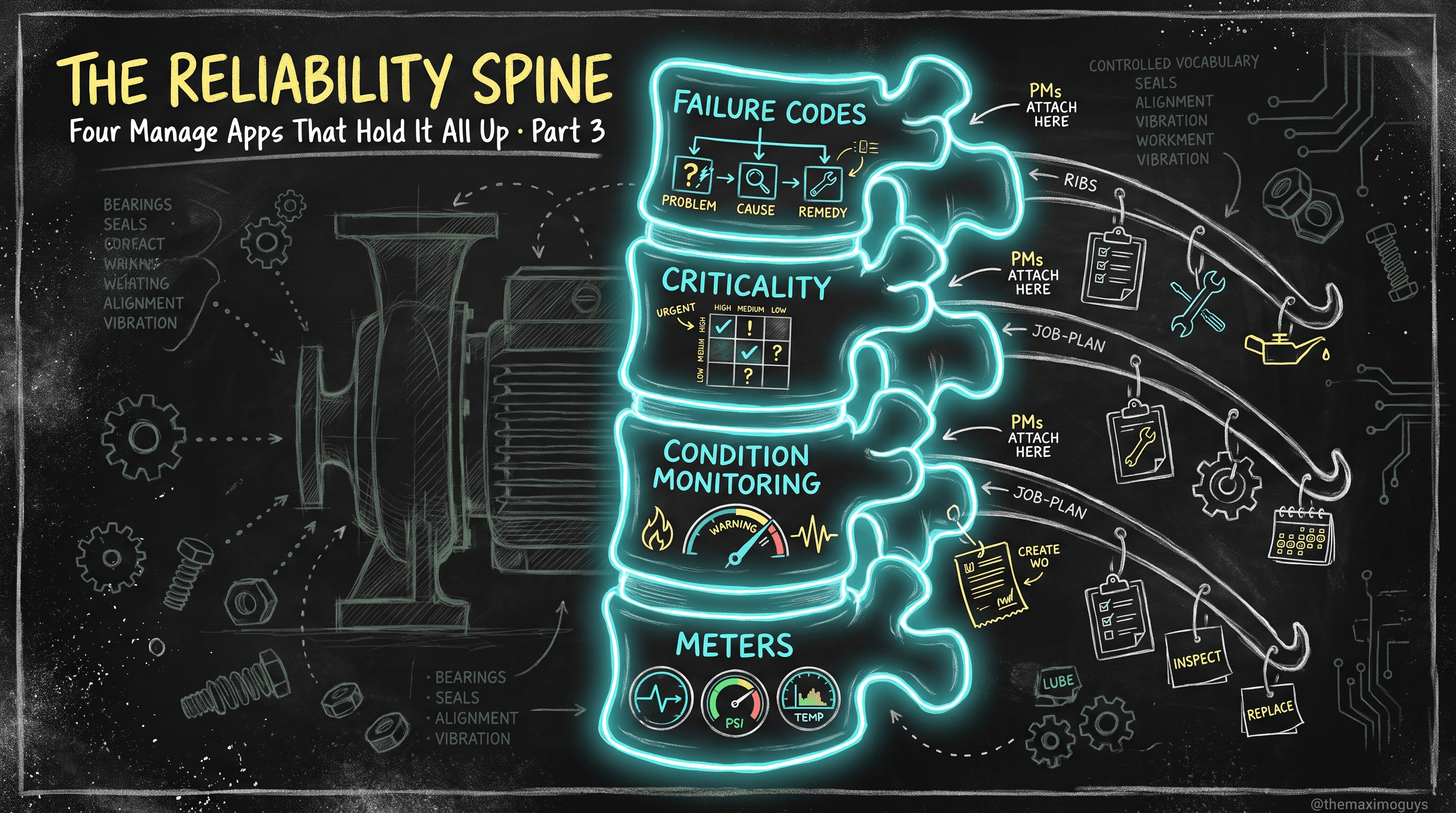
Populating the Spine: Data-Load Tools & Dependency-Correct Sequencing
🎯 Who this is for: Maximo administrators, data leads, and implementation engineers who have to actually load the reliability spine — and want to do it once, in the right order, without abandoned batches and orphaned hierarchies.
Series: Part 6 of 7 — MAS 9 Reliability Implementation Playbook | Read time: 22 minutes
🧱 Why the Data Load Is Where Projects Die
You can run a flawless FMEA (Part 1), design a beautiful spine (Part 3), and pick exactly the right job plans and PMs (Part 4) — and still watch the whole program stall on a Tuesday because a 12,000-row asset spreadsheet failed at row 4,300 and left a half-built hierarchy nobody can untangle. Data loading is the least glamorous part of a reliability implementation and the one most likely to sink it.
The reason is structural, not incidental. Maximo's MBO layer validates every write. When you push a record whose foreign key does not yet resolve — a condition-monitoring point that references a meter that does not exist, an asset installed into a location that has not been loaded — the MBO rejects it. That is a feature: it is the same validation that fires your business rules and keeps your data clean at the keyboard. But it means bulk loading is not "dump a spreadsheet in" — it is a sequenced operation where every step depends on the ones before it.
<aside>
💡 Key insight: The MBO layer's foreign-key discipline is why the load sequence is not a suggestion. You cannot "load it all and fix the errors later," because half your rows will reject and the other half will be orphaned. The order below is enforced by the platform; your only choice is to follow it or fight it.
</aside>
This part is deliberately the most tactical in the series. It covers the five realistic tools, the eleven-step order, the per-object specifics (including the notorious FAILURELIST gotcha), and the cleansing and batch discipline that keep a load from becoming a cleanup project.
🧰 The Five Realistic Load Tools
There are exactly five tools you will realistically use, and the most common mistake is reaching for the wrong one — usually Migration Manager for business data.
| Tool | What it is | Best for | Watch out for |
|---|---|---|---|
| Application Import ("Data Import") | Built-in spreadsheet (CSV/XML) import on Manage list views | Small, ad-hoc, app-scoped loads by functional users | No scheduling; weaker batch/error handling |
| MXLoader | Excel workbook driving Maximo REST/OSLC APIs | Large, repeatable, governed reliability loads; recurring feeds | Community-grade, version-sensitive, not formally IBM-supported |
| MIF (Integration Framework) | Object structures, enterprise services, endpoints | Large governed loads (asset/location master, big meter sets); message tracking + reprocessing | Higher setup cost (external system, enterprise service, endpoints) |
| OSLC / REST APIs | maximo/oslc, maximo/api endpoints | Engineered ETL pipelines, orchestration, idempotency logic | Build-it-yourself; same channel MXLoader uses |
| Migration Manager | Config/metadata promotion between DEV/TEST/PROD | Domains, app config, object structures, security | NOT business data — the single most common confusion |
MXLoader as the practitioner default
For most reliability spine loads — hundreds to low tens of thousands of rows, iterative, run by a reliability engineer rather than an integration developer — MXLoader is the practical default. It is an Excel front end that drives the same REST/OSLC channel a hand-built pipeline would, so every write still goes through the MBO layer and your business-rule validations still fire (which is good — it catches bad data at load time). The caveat to state plainly: MXLoader is a community tool, version-sensitive, and not formally IBM-supported. For high-volume, governed, auditable loads — asset/location master data, very large meter sets — prefer MIF, so you get message tracking and reprocessing.
Migration Manager is config-only
<aside>
⚠️ Watch out: Migration Manager moves configuration and metadata — domains, application config, object structures, security groups — between environments. It is not a business-data tool. Teams routinely try to "migrate" assets or PMs with it and are confused when it does the wrong thing. The rule is absolute: Migration Manager for config, MXLoader/MIF/REST for business data. Domains you build in DEV can be promoted with Migration Manager; the assets that reference them cannot.
</aside>
A note on support posture: MXLoader is the pragmatic default and it is fine for the reliability spine, but because it is unsupported, use MIF for the high-volume governed loads (asset/location master, large meter sets) so you get message tracking and reprocessing. Both MXLoader and MIF write through the MBO layer, so validations fire either way.
🔢 The Dependency-Correct Load Sequence
Here is the order, and it is not negotiable — each step exists because the next one references it. Load domains before anything, and safety plans last.
 1. Domains / value lists
 2. Classifications & specification attributes (CLASSSTRUCTURE, ATTRIBUTE)
 3. Failure class hierarchy (failure codes: problem → cause → remedy)
 4. Locations (top-down within each location system)
 5. Asset hierarchy (parents before children)
 6. Asset / location specifications & attribute values
 7. Meters & meter groups → apply to assets/locations
 8. Condition monitoring measurement points
 9. Job plans (header → tasks → labor / materials / services / tools)
10. Master PMs → PMs (and routes)
11. Safety plans
Why each step needs the prior one
- Domains first because classifications, characteristic meters, and coded fields all validate against them. A characteristic meter pointed at a non-existent domain is a rejected row.
- Classifications before specifications because specs reference classification attributes.
- Failure classes before assets because the asset's Failure Class field points at a class that must already exist (and classes are Organization-level).
- Locations before assets because you cannot install an asset into a location that has not been loaded.
- Asset parents before children because a child asset references its parent — the classic mid-batch failure.
- Meters before condition-monitoring points and meter-based PMs because both bind to a meter that must exist on the asset first.
- Job plans before PMs because a PM references the job plan it schedules.
<aside>
💡 Key insight: Read the sequence and you are reading the spine of Part 3 turned into a load plan. Domains and classifications underpin everything; the failure hierarchy and criticality come next; meters enable condition monitoring; job plans enable PMs. The load order is the dependency graph of the reliability program — which is why getting Part 3's design right makes Part 6 mechanical.
</aside>
🧬 Per-Object Load Specifics
The sequence tells you the order; each object has its own quirks.
The FAILURELIST restricted-object gotcha
This is the one that surprises everyone. The failure hierarchy lives in FAILURECODE and FAILURELIST, and FAILURELIST is a restricted object.
- The "NextGen" MXLoader currently cannot write `FAILURELIST` directly. Your options are: use the `MHFAILURELIST` object structure, use classic MXLoader, or (a DBA decision) make
FAILURELISTnon-restricted. - Maximo auto-generates the sequence values on the list, so any sequence numbers in your source file will not survive — do not build logic that depends on them.
- Failure classes are defined at the Organization level — load them once at the org, not per site.
Load the failure codes first, then the Problem → Cause → Remedy tree beneath each class.
Meters and meter groups
Load the meter masters first (continuous / gauge / characteristic — remember the characteristic meter needs its domain loaded in step 1), then the meter groups, then apply them to assets and locations (which creates the ASSETMETER / LOCATIONMETER rows). A meter-based PM later will fail if its continuous meter is not yet on the target asset — the meter application step is what prevents that.
Condition monitoring points
Load measurement points after meters exist. Each point binds a gauge or characteristic meter to an asset/location, with upper/lower/warning/action limits and a referenced job plan or PM. Do not forget the "Use Action Limits" flag (Part 3) in your load template — it is a real column, and omitting it defaults to warning-limit noise.
Job plans and PMs
Load job plans header-first, then tasks, then estimated labour / materials / services / tools (children reference the job plan and task sequence). Then load Master PMs first if used, then PMs, supplying frequency (time or meter-based), lead time, job plan, route, and job-plan sequence. A meter-based frequency requires the meter already on the asset — the reason meters precede PMs by three steps.
Per-object field reference
| Object | Load after | Key fields / gotchas |
|---|---|---|
| Domains | (first) | Value list; characteristic meters and coded fields validate against these |
| Classifications | Domains | CLASSSTRUCTURE, ATTRIBUTE; specs reference them |
| Failure hierarchy | Classifications | FAILURELIST restricted → MHFAILURELIST; sequences auto-generated; org-level |
| Locations | Failure hierarchy | Top-down within each location system |
| Assets | Locations | Parents before children; references failure class + location |
| Meters | Assets | Continuous/gauge/characteristic; characteristic needs domain; apply to assets |
| Condition points | Meters | Binds meter + limits + job plan; include "Use Action Limits" |
| Job plans | Condition points | Header → tasks → labor/materials/services/tools |
| PMs / Master PMs | Job plans | Frequency needs meter on asset for meter-based; Masters before children |
🧹 Validation & Cleansing Before You Load
The biggest reliability-data risk is legacy 7.6 free-text failure data — a decade of "pump broke," "same as last time," and "see notes." Loading it as-is guarantees garbage MTBF (Part 2) forever. Cleanse before you load, not after.
- Deduplicate failure codes; map free-text problems/causes/remedies to your standardized code set; discard or re-bucket unusable history rather than importing noise.
- Standardize classifications, and validate every coded field against its domain — domain mismatch is the number-one cause of rejected rows.
- Rehearse the full sequence in TEST/staging at production-like volume before touching PROD. A load that works on 50 rows can fail on 50,000 for reasons (memory, timeouts, a single bad parent) you only see at scale.
- Profile the legacy data first. Pull
FAILURECODE/FAILURELISTand the work orderFAILUREREPORThistory and quantify the free-text percentage — that number is your cleansing backlog and it belongs on the project plan.
<aside>
⚠️ Watch out: The upgrade window is your one clean moment to do this cleansing (Part 7's Phase 0). Once you are live in PROD, you rarely get another window to fix the failure hierarchy without disrupting operations. Carrying free-text failure data forward "to clean up later" is the single most common way a reliability program is quietly doomed on day one.
</aside>
📦 Batch Discipline
Even in the right order with clean data, how you batch determines whether a failure is a five-minute reprocess or a five-hour forensic exercise.
- Batch size: 500–2,000 rows. Small enough that a failure isolates a manageable set; large enough to finish in reasonable time. A single 50,000-row batch that fails at row 30,000 is a nightmare to reconcile.
- Validate parent references exist before loading children. For assets and locations, confirm the parents are loaded and committed before the child batch runs.
- Reconcile row counts post-load. Loaded ≠ committed. Count what you sent, what committed, and what rejected — and account for every rejected row before moving to the next object.
- Keep the rejects. Every load tool produces an error/reject file. Triage it immediately; rejected rows are not "lost," they are "not yet loaded," and they must be corrected and re-run before the dependent object loads.
🧮 A Fully Worked Load: A Pump Family's Failure Hierarchy
Let us load one object end to end — the failure hierarchy for the PUMP-CENTRIFUGAL class — so the sequence and gotchas are concrete.
- Confirm domains exist (step 1). Any coded fields the failure tree references (e.g. a remedy-type domain) must be loaded and committed first.
- Load the failure class
PUMP-CENTRIFUGALat the Organization level via classic MXLoader or theMHFAILURELISTobject structure — not NextGen MXLoader againstFAILURELISTdirectly. - Load the Problem level: SEAL-LEAK, BEARING-FAIL, IMPELLER-EROSION — each referencing the class. Do not populate sequence numbers; Maximo auto-generates them.
- Load the Cause level under each problem (SEAL-FACE-WEAR, DRY-RUN under SEAL-LEAK; FATIGUE, CONTAMINATION under BEARING-FAIL).
- Load the Remedy level under each cause (REPLACE-SEAL, INSPECT-ALIGNMENT).
- Batch at ~500 rows, reconcile counts, triage rejects (a common one: a Cause row whose Problem parent was in a batch that had not committed yet).
- Later (step 5 of the master sequence): assign the class to the assets. Now the pumps' Failure Class field points at a class that already exists, and technician failure reporting (Part 3) is constrained the moment the assets go live.
The result: a controlled failure vocabulary, loaded in dependency order, with no orphaned nodes — ready for the work orders that will produce Part 2's analyzable MTBF.
🩺 Troubleshooting Rejected Rows
| Rejection symptom | Root cause | Fix |
|---|---|---|
| "Value not found" on a coded field | Domain not loaded (step 1 skipped) | Load and commit the domain first, then re-run |
| Child asset rejected: parent not found | Parent in a later batch, or a prior batch not committed | Load and commit parents before children |
| FAILURELIST write fails in MXLoader | Restricted object; NextGen can't write it | Use MHFAILURELIST object structure or classic MXLoader |
| Meter-based PM loads but never fires | Continuous meter not applied to the asset | Load and apply the meter to the asset (step 7) before the PM |
| Condition point generates constant noise | "Use Action Limits" column omitted from the load | Include and set the flag; re-load the affected points |
| Duplicate failure classes across sites | Loaded at site instead of org level | Consolidate to Organization-level classes |
📋 Practical Notes: Data-Load Runbook
- Pick the tool per load, not per project. MXLoader for iterative spine loads, MIF for governed high-volume master data, App Import for one-offs, REST for pipelines, Migration Manager for config only.
- Follow the eleven-step order literally. Domains first, safety plans last; never load a child before its parent.
- Cleanse and profile the legacy failure data before you load a single row — and do it in the upgrade window (Part 7).
- Rehearse the full sequence in TEST at PROD volume. The load that works small can fail large.
- Batch at 500–2,000 rows, keep the reject files, and reconcile counts on every object before moving to the next.
- Handle `FAILURELIST` as a restricted object —
MHFAILURELISTor classic MXLoader, no source sequences, org-level classes.
<aside>
💡 Key insight: A good data load is boring — sequenced, batched, reconciled, rehearsed. That boredom is the goal. The exciting data loads are the ones failing at row 4,300 in production at 2am. Everything in this part exists to make your load boring, which is another way of saying: to make it succeed.
</aside>
Key Takeaways
- Five realistic tools, used for the right job: App Import (one-offs), MXLoader (iterative, community-grade), MIF (governed volume), REST/OSLC (pipelines), and Migration Manager (config ONLY — never business data).
- The MBO layer rejects unresolved foreign keys, so the eleven-step order is mandatory — domains first, safety plans last, parents before children.
- `FAILURELIST` is a restricted object: use the
MHFAILURELISTobject structure or classic MXLoader, expect auto-generated sequences, and load classes at Organization level. - Cleanse before you load — deduplicate and standardize free-text failure data, and validate every coded field against its domain, because domain mismatch is the top rejection cause.
- Discipline the mechanics: batch at 500–2,000 rows, rehearse in TEST at production volume, validate parents before children, and reconcile row counts on every object.
References
IBM Official
- Maximo Manage — Integration Framework (MIF) overview (IBM Documentation)
- Maximo Manage — Migration Manager (IBM Documentation)
- Maximo Manage — Application Import/Export (IBM Documentation)
Community
Series Navigation
| Previous: | Part 5 — The APM Layer as Reliability: Health, Predict, Monitor & AIP |
|---|---|
| Next: | Part 7 — The Phased Rollout: From Legacy Cleanse to Closing the Loop |
About TheMaximoGuys: We help Maximo teams navigate the move to MAS 9 with practical, no-hype guidance grounded in how the platform actually behaves — from architecture and migration planning to the day-to-day work of configuring, extending, and running Maximo.
Published by TheMaximoGuys | July 2026

 Venkat Achanta